
Google AI Ecommerce Search for nopCommerce: Free AI Product Search Plugin Released
October 31, 2026 – NopShine today released Google AI Ecommerce Search for nopCommerce, a free plugin that connects your store's search box to Google Cloud Vertex AI Search for commerce (the Retail API). Your customers get search results ranked by Google's retail AI, and your store keeps every rule it already applies to products.

Why AI-powered product search?
Shoppers don't always type the words in your product names. They search for what they want, use synonyms, and make typos. A plain keyword search can miss those products, and a search with no results is often a lost sale. Google's retail search AI understands intent, synonyms and spelling mistakes, and it ranks results by relevance.
See the difference: the same search, before and after
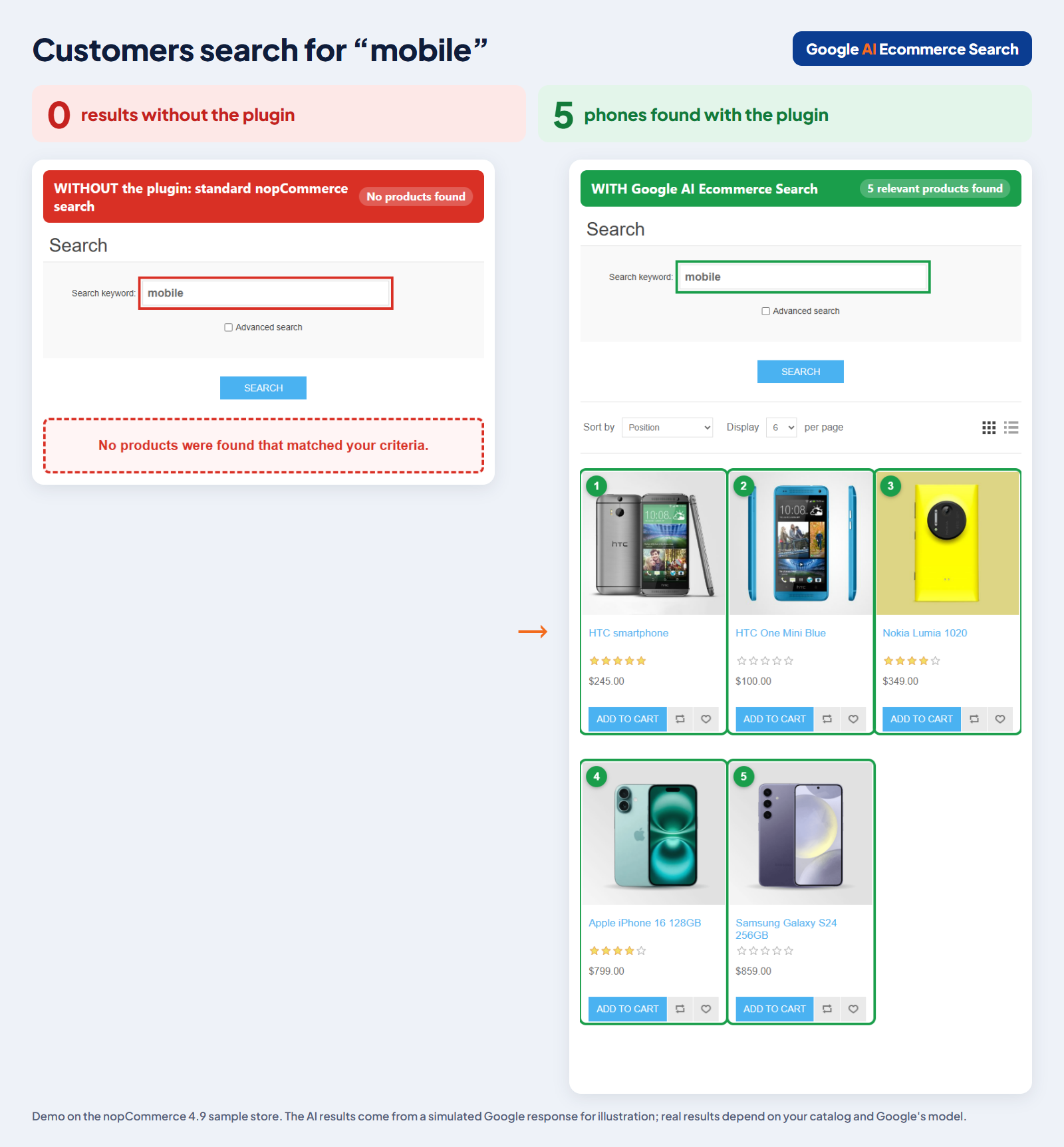
We ran two everyday searches on the nopCommerce 4.9 demo store. The sample catalog sells phones, desktops and laptops, but no product has the word "mobile" in its name, and only one has the word "computer".
Search for "mobile": 0 results become 5 phones
Search for "computer": 1 result becomes 9 desktops and laptops
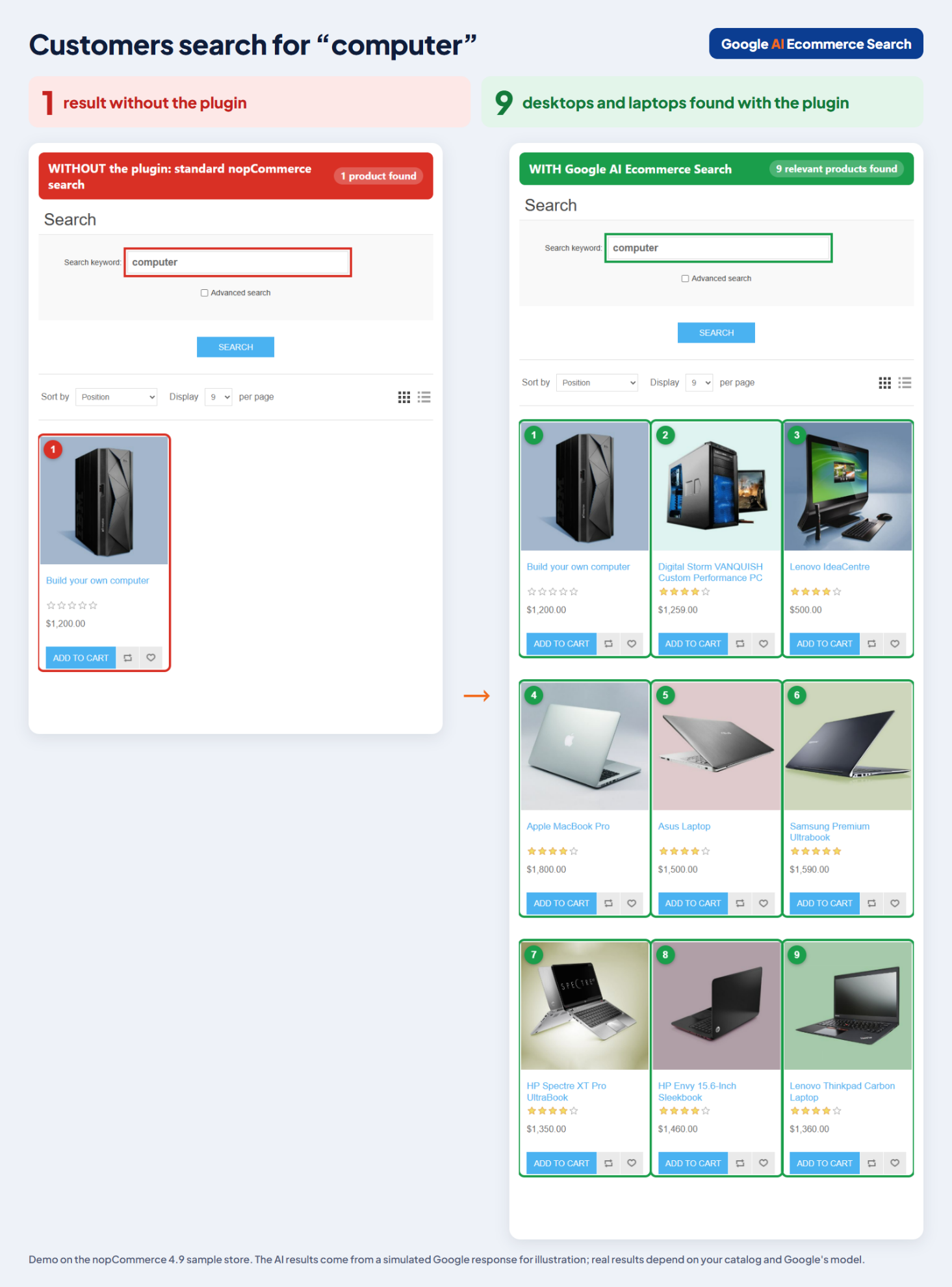
About this demo: the screenshots come from the nopCommerce 4.9 sample store. The AI results were produced with a simulated Google response for illustration. Real results depend on your catalog and on Google's model.
What the plugin does
- Google-quality results on the storefront search page and in search autocomplete.
- One-click catalog sync sends your products to Google with categories, brands, tags, price, stock status, product URL and main image.
- Live updates (optional): new, edited, unpublished and deleted products are sent to Google automatically.
- Sorting still works: "Position" keeps Google's relevance order, and name, price and newest sort the AI results.
- Easy setup: paste your Google service account key in the admin area. It is stored encrypted, and no server configuration is needed.
- No extra libraries: the plugin calls Google's REST API directly, which is how it runs on every supported nopCommerce version.
Safe for your store by design
Search never breaks. If Google is unavailable, times out or finds nothing, your store quietly falls back to the standard nopCommerce search. Your own rules still apply to every AI result: published status, store mapping, customer-role (ACL) restrictions, availability dates, and the category, manufacturer, price and vendor filters.
One download for nopCommerce 4.1 to 5.0
The download is a single ZIP that contains a build for nopCommerce 4.10, 4.20, 4.30, 4.40, 4.50, 4.60, 4.70, 4.80, 4.90 and 5.00, together with the free NopShine Core plugin. Upload it under Configuration > Local plugins > Upload plugin or theme, and your store installs the build that matches its version. On nopCommerce 5.0 the plugin uses the built-in AI search hook; on 4.x it plugs into the standard product search.
Get started in four steps
- Download the plugin from the product page and upload the ZIP in your nopCommerce admin area.
- Install NopShine Core first, then Google AI Ecommerce Search.
- In Google Cloud, enable the Retail API and create a service account with the Retail Editor role.
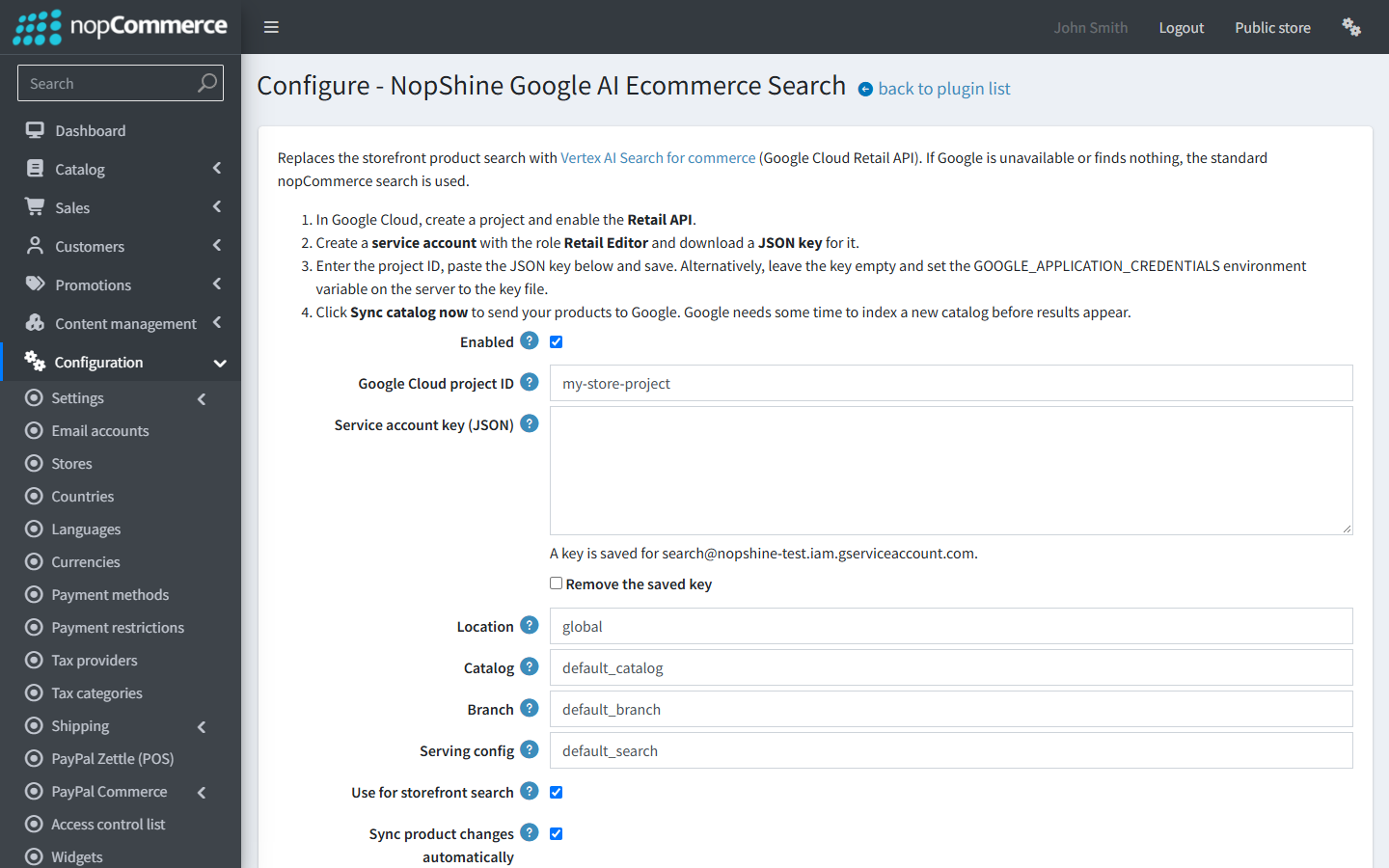
- Enter the project ID, paste the JSON key, tick Enabled, and click Sync catalog now.
The step-by-step setup guide walks through every screen, including Google Cloud and troubleshooting.
Frequently asked questions
Is the plugin free?
Yes. The plugin and NopShine Core are free. Google charges for the Retail API according to its own pricing.
Which nopCommerce versions are supported?
Every major version from 4.10 to 5.00, all in one download.
What happens if Google is down?
Your store uses the standard nopCommerce search until Google answers again, so the search box keeps working.
Does it work with other search plugins?
Search plugins that use nopCommerce's own search mechanism, such as Lucene in 4.6 and later, keep working and answer whenever the AI search falls back. In nopCommerce 4.x, only one plugin can replace the product search service; the configuration page warns you and names the other plugin if there is a conflict.
Does it collect any data?
NopShine Core sends anonymous usage statistics: store URL, nopCommerce version, and the installed NopShine plugins and their versions. You can turn this off on the NopShine Core configuration page.
Download Google AI Ecommerce Search
Give your shoppers search that understands them. Download Google AI Ecommerce Search for nopCommerce for free, and follow the setup guide to go live.